
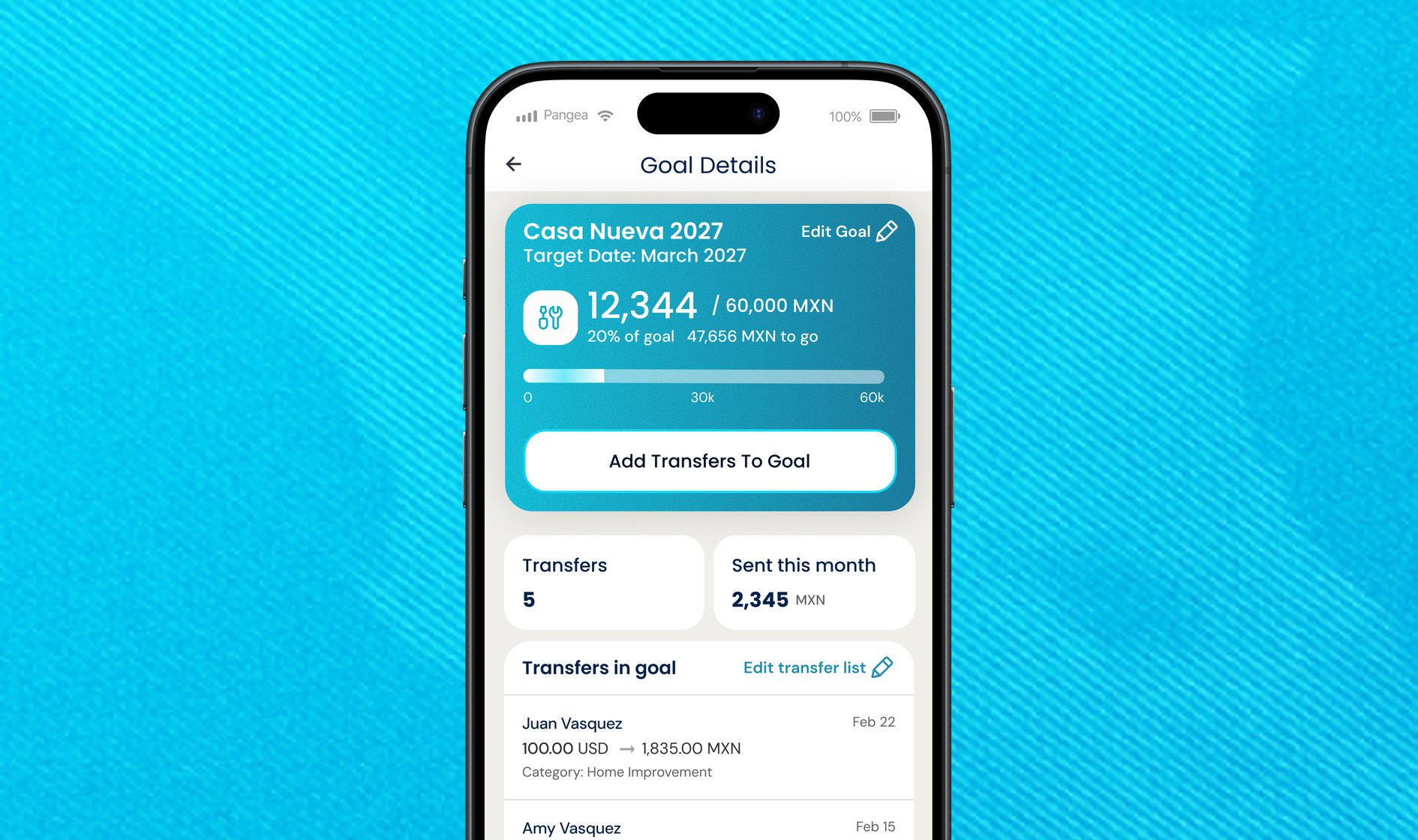
Sending money across borders is rarely just a transaction. It’s a way to take care of the people you love. Whether you are funding a home renovation project, paying for a child's school tuition, or working toward a long-term dream, every transfer is another step toward that goal.
When you are managing these commitments entirely in your head, keeping track of your progress can feel overwhelming.
That is why we are introducing Pangea Goals, a new feature that helps you organize your transfers around the milestones that matter to you.
Set a target amount in your receiver’s local currency, link your transfers to the Goal, and see your progress in one clear view. Your progress bar shows how much you have contributed and how much remains, giving you an easier way to plan and stay on top of what you are working toward.
How To Get Started in 3 Simple Steps
Getting started takes less than a minute:
- Create & Personalize Your Goal: Give your goal a name (like "Building a home" or "Tuition 2026"), enter the target amount in your receiver's currency, and pick a custom icon and color scheme to make it yours.
- Link Your Transfers: Every time you send money, you can choose to tag that transfer directly to your goal in just a tap. You can even link past transfers to get a head start on your progress!
- Track Your Progress: Watch your progress bar hit 100% when your transfers are complete, and celebrate reaching your milestone!
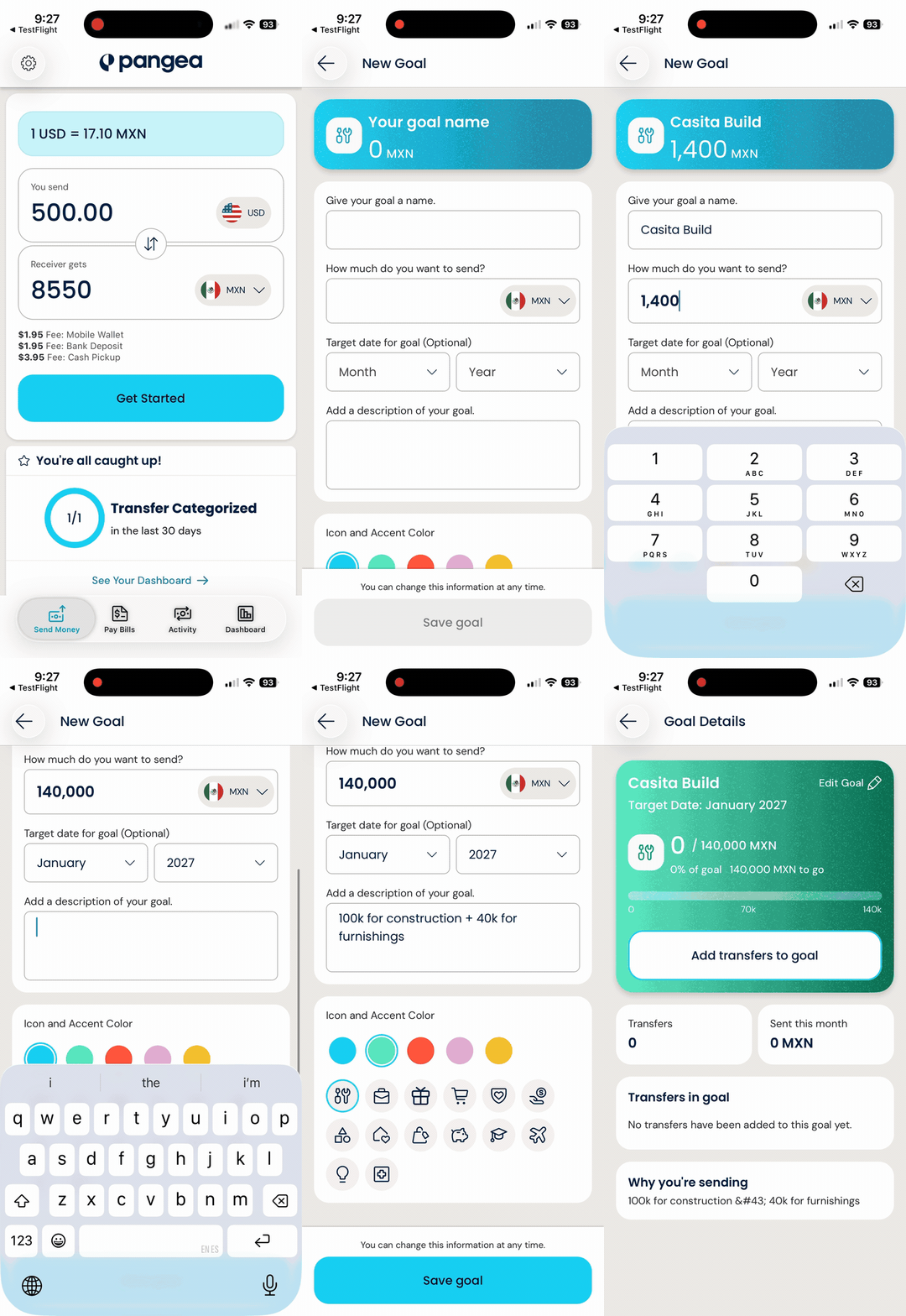
Open your Pangea app today, head to the side menu, and set up your very first goal,
How Goals Work Alongside Tags
If you already use Tags in the Pangea app, Goals work right alongside them. While tagging is about what type of spending your transfer goes toward (like "Medical" or "School Expenses"), Goals group those transfers toward a specific milestone with a total target amount (like "Building a home" or "Tuition 2026").
You don’t have to choose between them: a transfer tagged under "School Expenses" can easily be linked to your "Tuition 2026" Goal at the same time!
Where to Find Pangea Goals in Your App
We’ve made accessing your Goals seamless across your everyday app flow. You can find, create, and view your Goals in three convenient places:
- In the Side Navigation Menu
- On Your Dashboard
- Right Under the FX Calculator
Ready to get started? Make sure to download the latest version of the app!
Frequently Asked Questions:
Are Pangea Goals different from the Pangea Dashboard?
Yes. Your Dashboard gives you an overall view of your transfer activity, while Pangea Goals helps you track selected transfers toward a specific target.
You can access Goals from your Dashboard, but each Goal has its own target amount, linked transfers, and progress.
Can I create a Goal without adding a target date?
Yes. Adding a target date is optional, so you can create and track a Goal without one.
Can I create multiple Goals?
Yes. You can create multiple Goals to track different milestones at the same time.
How do I add a transfer to my Goal?
You can add transfers while your Goal is In Progress in two ways:
- After sending money: If you have an active Goal in the same receiving currency, you will see an option to link the transfer from the post-transfer screen.
- From your Goal details: Open your active Goal, select Add transfers to Goal, and choose the transfers you want to link.
You cannot add transfers after a Goal has been completed.
Is there a deadline or penalty if I do not reach my Goal?
No. Goals do not have required schedules, monthly targets, or penalties. You can work toward your Goal at the pace that works for you.
DISCLAIMER – This content is for informational purposes only. Pangea and its affiliates do not provide financial, legal, investment or tax advice.
*Rates on the image are for illustrative purposes only and do not represent actual exchange rates.