

At Pangea, we’re constantly working to find better ways to serve you. As part of our commitment to our customers, we’re thrilled to announce you can now send money directly from your bank account to cash pick-up locations, debit cards or bank accounts abroad.
Why Send From Your Bank Account
Sending directly from your bank account is a more cost-efficient way to transfer money. Simply, you will get a better exchange rate. However bank transfers can take up to five business days to reach your receiver. You can still send instantly with your debit card, but if you’ve got extra time, sending from your bank lets you maximize your transfer.
Is It Safe?
Yes, sending from your bank account is safe. At Pangea, it is our top priority to keep your information private. Your bank account must be authenticated by you and all of your private data is encrypted. Bank transfers are made through the Automated Clearing House (ACH) network, which securely processes millions of electronic money transfers every day.
How Long Do Bank Account Transfers Take?
Bank transfers can take up to five business days to arrive (they can only be processed during bank hours).
What Exchange Rate Do I Get When I Send from My Bank Account?
You can see the exchange rate on our exchange rate calculator in the Pangea App or on your web browser. You will see different rates for sending from a debit card and sending with a bank account. Debit card transactions are processed instantly, while bank account transfers can take up to 5 business days, but offer a better exchange rate.
How Do I Use Pangea to Send from My Bank Account?
To start sending money directly from your bank account, simply connect your bank account as a payment method either through our website or mobile app.
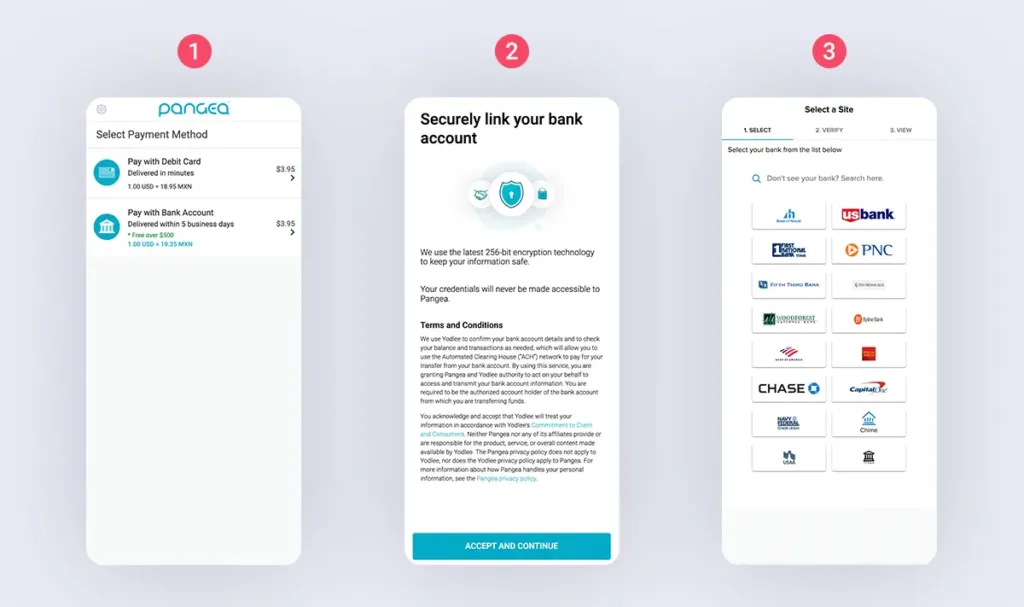
- When you are prompted to select your payment method, select Pay with Bank Account. If you’ve already connected your bank account to Pangea, select the account you wish to use. If you don’t have a bank account already connected to Pangea, select Add a Bank Account.
- A terms and conditions screen may appear if you have not already connected an account. These terms must be accepted in order to add a bank account.
- Select or search for your bank. If you do not see your bank, it may not currently be supported by our authentication service, but check back later as it may be added in the future.
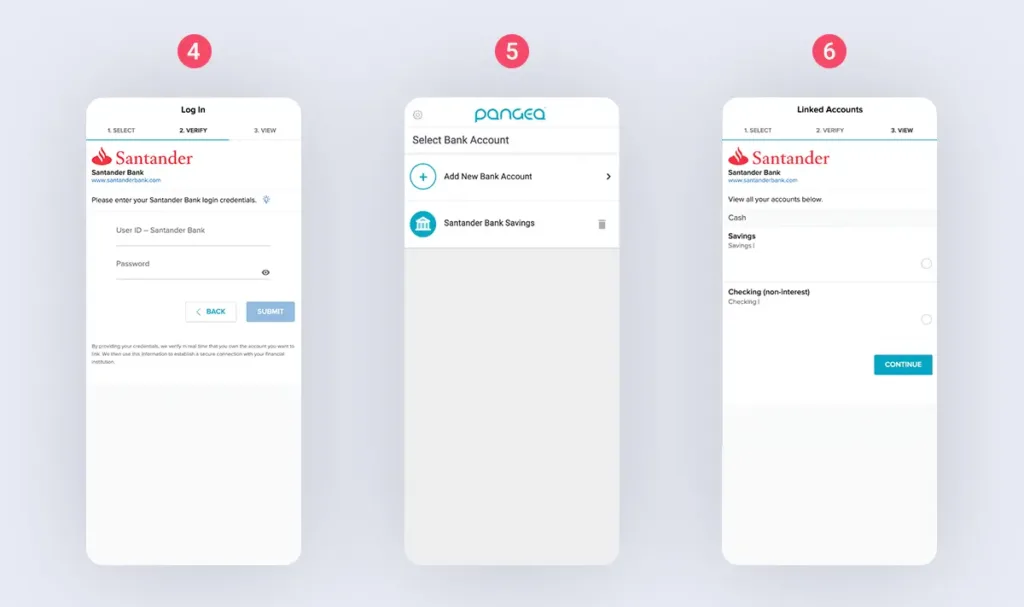
- Once you’ve selected your bank, you will be asked to log in with your bank username and password to link your account. Your information is kept completely private and secure and only you will be able to use it to transfer with Pangea.
- Depending on your bank, you may be asked for 2-factor authentication, like a text code or security question. This is an added layer of security to authenticate your identity.
- Select the bank account you would like to link (for example, checking or savings). Once you submit your bank account selection, you will be able to pay for transfers with your bank account!
If you have any questions or concerns regarding this process, please feel free to contact us at +1 866-858-9928! We are more than happy to help you.